Customer Accounts
You can view the account information of a customer through Customer Accounts from the menu on the left pane.
You can sort customers based on Customer Account Name and Customer Account ID in alphabetical/numerical order.
You can also filter customer accounts based on Address, Customer Account Name, and Customer Account ID.
To view the account information of a customer, click on the  icon against the customer record displayed.
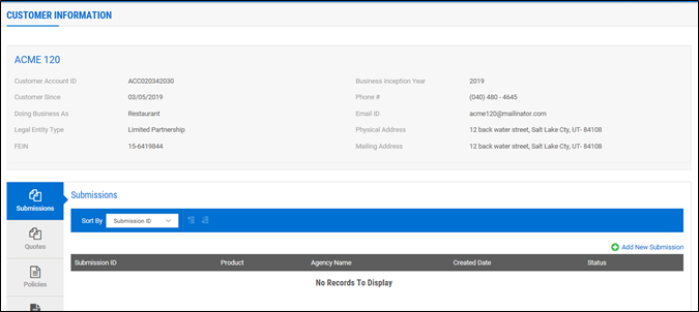
The customer information captured during quote creation including Quotes, Policies, and Claims of the customer will be displayed as shown:
Quotes
Here, you can perform the following functions.
-
View the list of quotes that you created.
-
Proceed with the existing quote through the
icon or create new version of the quotes or copy quote within the submission. -
Sort quotes based on Transaction Date, Policy Effective Date, and Agency Name.
-
Reassign the current user or the UW-on-File (underwriter who is working on that file) to another user through Reassign Quote.
-
Assign a quote to yourself through Make this Quote Mine option. (You can assign only one quote at a time through this option).
Policies
Here, you can perform the following functions.
-
View the list of Policies that are in force.
-
Proceed to initiate new business transactions for the customer through the
icon displayed against each record. -
Sort Policies based on Policy Number and Policy Effective Date.