View Your Policies
From dashboard, you can navigate to this screen by clicking View Policy option of a desired policy. Alternatively, you can also navigate to this screen by clicking Policies under menu on the header.

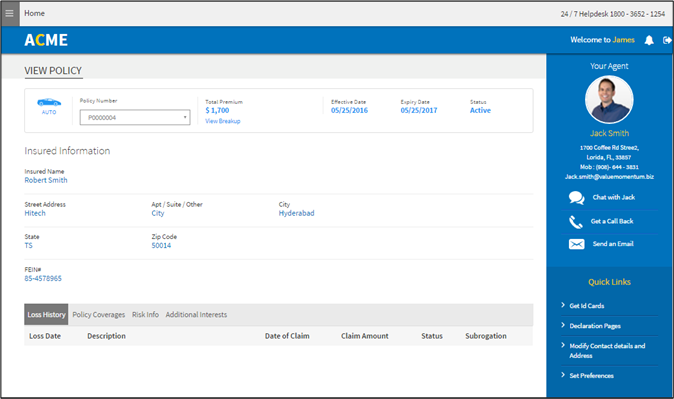
By default, the application displays the recent policy information. To view the information of a different policy, select policy number from the Policy Number dropdown list.
The details include the following:
-
Insured Information – Displays insured details.
-
Loss History – Displays the list of losses recorded for a policy.
-
Policy Coverages – Displays the coverages that apply to that particular policy.
-
Risk Info – Displays the risk information provided for the policy.
Example: For a vehicle insurance policy, you can view the information about the vehicles insured under this policy.
-
Additional Interests – Displays the list of additional individuals/business firms who are interested in any one or more of the risks.